
Good to know
Days = 24-hour blocks
Counted from activation, not calendar days. No wasted hours.
Auto-activates when you land
Data starts counting from first connection, not purchase.
No calls/SMS — use apps instead
WhatsApp, Viber, FaceTime all work over your data connection.
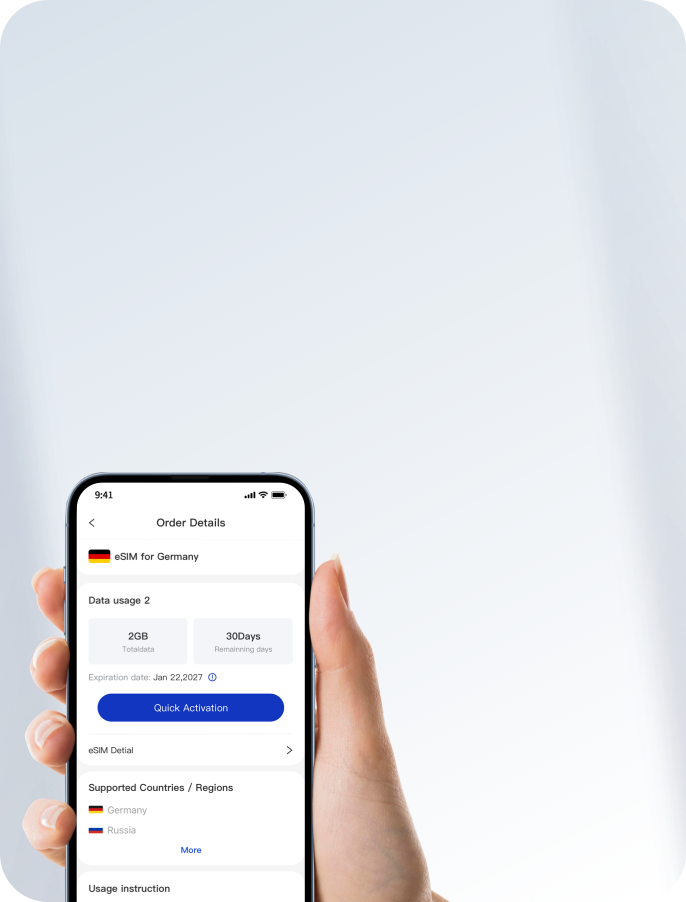
Manage everything in the App
Activate with one tap and repurchase anytime during your trip.
Operator
Widest coverage incl. remote islands; #1 for Bali, Lombok, Java & Komodo
Best city speeds (XL); always-on backup during long road trips (Smartfren)

eSIM for Indonesia


Get an eSIM for Indonesia and enjoy reliable and affordable internet access on your trip.
Select plan
More plans
2GB/day
High-speed, resets daily
5G/4G
In all major cities
365d
Activation window


Unactivated Refund

24/7 online customer support

Quick eSIM activation via our app

Real-time data usage tracking

Competitive pricing


Activate in 3 Easy Steps


Place your order
Receive QR code via email. (If you don't see the email, please check your spam folder)

Install eSIM
- In the app, tap “Quick Activation” to automatically install and activate your eSIM.
- Scan your plan’s QR code and follow the on-screen instructions to complete the setup.

Auto-Connect on Arrival
Turn on your eSIM at arrival to start roaming data instantly—automatically connect to local networks without any setup.
Why choose us?
Here's how AirZlink eSIM compares to other brands like Airalo and Holafly for your travel needs.
 Choose from Unlimited day pass or fixed data plans
 Fixed plans onlyOnly unlimited day passesWorth every pennyMore expensive than AirZlinkMore expensive than AirZlinkReach us quickly — chat with us on WhatsApp
 Email support — response time may exceed 24 hoursEmail support — response time may exceed 24 hoursWe'll refund you in full if you can't use the eSIM, with no time limitA refund request must be made within 30 daysA refund request must be made within 6 monthsData plans valid for 1 years1 to 30 days onlyDay pass plans expire in 24 hoursSupportSupportLimited support
Ratings and reviews
Frequently Asked Questions
Everything you need to know about eSIMs, using AirZlink, and staying connected while you travel.
What Is eSIM and How Does It Work?
eSIM is short for embedded SIM, which is a small chip inside your phone or mobile device that lets you instantly download a data plan and get connected.
In other words, you don't need to remove or replace your physical SIM card to add a secondary (dual-SIM) data plan to your device.

How to Install AirZlink eSIM?
With AirZlink, installation takes just minutes — no SIM tool needed.
Read our quick installation guide for step-by-step instructions on installing your eSIM via QR code or the AirZlink app.